

QuickBooks Online
We have added an integration for QuickBooks Online!
With QuickBooks Desktop having a stop-sell last year, many members were out of luck when looking to upgrade their QucikBooks. We now offer an integration with QucikBooks Online version and would be happy to help get you all set up.
The invoice export process is the same as the old desktop version, so you can upload invoices individually, or in a batch. Set up is slightly different, so if you are looking to start with QuickBooks Online, please let us know.
New PO System
We have added a new Purchase Order system to PlantX. Keep your vendors and purchases organized and up to date. This latest upgrade aims to organize your data, boost your productivity, and help make inventory entry easier.
Our new PO system organizes all your data into a unified, easily accessible format. No more sifting through piles of paperwork or juggling multiple spreadsheets. Vendor details such as contacts, addresses and other info is all kept in one place. Purhcase orders are organized and easily kept track of with custom PO numbers.
With a familiar interface, PO entry should be easy and efficient. We have also added features related to cost tracking and inventory set up all in one place. We are also adding a feature that allows you to create a purhcase order from order items. This facilitates "just-in-time" ordering and fulfillment for those who take a broker approach.
Our new system simplifies the inventory entry process, allowing for quick and easy input of stock information. The new inventory creation is a one-click process, significantly reducing the time spent on inventory updates and reducing errors. Generated inventory integrates seamlessly with the existing inventory to ensure that all your quantities are up to date and accurate.
New Mobile Apps
A long awaited update to all of our mobile applications has been released. This is by no means the last update, and there is much more content and management features coming soon.
All our new apps are fully optimized for web use, ensuring a seamless experience across various devices. Whether you're using a desktop, laptop, tablet, or phone, you can access the web portal from any browser. This cross-device compatibility ensures that you can manage your operations from anywhere, with consistent performance and user experience.
Yes that means that you can now use PlantX on any iOS, Android, or other mobile device that has a web browser and an internet connection. (Even Desktop computers too!)
Check out the Installation page for more information on how to access them.
Added Print Availability to Sales Rep Edition
In the Sales Rep Edition, there is a new button for the sales rep to print thier own availability rather than asking you! This is the same availability template that your website uses so there is no extra work for you.
We also added the ability for sales reps to import orders from an Excel Spreadsheet.
New XLS Pricing Import
We have added new import feature that allows an existing pricing table to be updated via an Excel Spreadsheet.
Requirements are:
- Botanical Name
- Size
- Price @ Qty Break 1
- Price @ Qty Break 2
- Price @ Qty Break 3
There is a new Report in the Catalog Listing section called Catalog Pricing Import-Export. Run this as an Excel spreadsheet and update the prices. Then in the Inventory window, go to the Inventory drop down and select "Import prices (XLS)" and follow the steps to import.
General Quality of Life Changes
- Added Show Avail Only Filter to Inventory, Order Entry, websites, etc.
- Expanded Label Options for custom label printing
- Website fixes and api updates
- General Security Enhancements
New Search Options and Filters
We have added new search and filtering options for PlantX. The Customers and Inventory windows have been updated with this new feature and we are planning to add more. It is designed to give you more options closer to what you are working on, and not hidden in a menu.
You will notice a large drop down arrow next to the search bar in Customers and Inventory. Once open, you should notice there are a few options that were previously in the View menu and we have added special search fields for Inventory. The most important of these options is the 'show hidden' which has moved from the View menu to this new search feature.
Image Policy Update
The image servers store and convert pictures for the various tasks in PlantX. Whether it is a plant picture on the web, or the company logo for your printed forms, the image servers are called to action. The stalled image servers last week were caused by uploaded pictures from phone(s) with oversized dimensions. Scaling the uploaded images exceeded the amount of memory available to handle back-to-back conversion of several 6,000x6,000 pixel images. To resolve the issue, we've doubled the amount of memory on each image server. PlantX will also institute limits on image dimensions to avoid unnecessary storage and compute times.
Why now, what changed? Cell phones continue to improve and so do their cameras. In this case, the phone used to take and upload the pictures was 6,000 by 6,000 pixels, called 6K for short. 6K images are 18 times larger than the average computer screen! 6K pictures are 4 times larger than any modern 4K computer screens, 65” 4K-UHD TVs, and even a high-resolution printed letter-size page. So on the whole, 6K pictures are overkill, and certainly unnecessary for any uses in PlantX.
If 6K and higher pictures are overkill, then why do modern phones offer them? Marketing plain and simple. More megapixels is an often highlighted feature designed to motivate you to buy the next best phone. But there's very little those pixels can do but to take up more space and require more processing power. Ever notice how the phone always prompts you to reduce the file size before sending it to someone? So what's the point of taking an ultra-high resolution picture if you immediately throw those extra pixels away before you can display it or do anything useful with it.
To help PlantX users manage their pictures, and to avoid excess storage and processing overhead, we are instituting a picture policy change. Previously, any pictures uploaded to PlantX were stored as the original uploaded file so that it could be retrieved for later use. This meant PlantX would act as your picture library, where you could download the exact file that was uploaded. But because picture sizes have become untenable, PlantX will begin enforcing size limits by reducing uploaded files. The limits will be both on file size (in megabytes) and on image dimensions, limited to 4K (3440x3440). You will still be able to capture and upload images up to 6K, but PlantX will reduce it to 4K dimensions before storing. This will reduce the amount of storage and processing time, while still preserving the image quality for any future uses for displays and print media. The original file is no longer stored, and any future download of the image will be the reduced image.
To facilitate this change, the PlantX picture upload will be upgraded to provide more information about your pictures being uploaded. You will be notified if a picture requires any reduction in size before the upload begins. Any oversized pictures already uploaded to PlantX will be reduced to 4K after advance notification.
To better use pictures on phones, you can reduce the resolution. It seems silly to buy a phone with ultra-high resolution, but then reduce the dimensions of the captured picture. But if most uses require a reduced size, then it is often best to do it when the picture is taken. All modern phones have special chips required to handle and manipulate these megapixel monster photos. These chips instantaneously form the entire picture in memory, with all the raw image details, which means it's the best time to make the most accurate, highest quality image reduction. These specialized chips are already programmed to discard “noise” and details not seen by the human eye in order to make smaller picture files. Without this reduction each 6K picture file would be 144MB! So let the same chip do the image reduction while it has all 144MB of raw picture data to make the most useful 4K picture. Just check your camera app settings (usually the gear icon) and select a smaller image size, like 4K (3840x2160) or something close to it. The pictures will often look better on your phone too because their displays are limited to 4K at best.
Amazon Partial Hardware Failure
Every process running on a computer depends on accurate time in some fashion. They all depend on the computer's System Clock, which is just like the clock on the wall. What would happen if the clock quickly moved 7 hours into the future? Time to go home, right!
This is what happened to our main application server running on Amazon's platform. Within a span of 2 minutes the system clock jumped 7 hours into the future. This creates unfathomable amounts of confusion as the computer assumes too much time has passed, it panics, and starts shutting down. Consequently, we restarted the service, it ran for a few hours, only to have the server correct itself and move the clock back 7 hours wreaking more havoc.
To remedy this, we completely restarted the faulty server. Doing so, Amazon should allocate new hardware. There are no guarantees as to which machine they give us, but this solved a similar issue we encountered last fall.
Meanwhile, we are nearing completion of 2 years of work that allows us to run our service with multiple redundant servers. For example, instead of running one combined service, by week's end, we will be running 2 transaction servers, 2 query servers and up to 8 report servers. Should one server fail due to Amazon's bad time-traveling plot, the remaining servers will take up the slack and keep going. Now if we could only use Amazon's time-traveling bug to go back a week and get this in place sooner and none of this would have ever happened.
Changes to the Product Attributes
This upgrade includes changes to the way product attributes are managed in PlantX. The changes make the attributes more assistive and less restrictive, solving some issues and paving the way for new features.
The motivation for the change was eliminating clutter in the attributes master list. Old attributes couldn't be deleted because they were used by products, order items, invoices, etc. This upgrade breaks this rigid relationship between the attributes master list and those attributes used on the products. The master list now acts as a list of suggestions, or preset values, when entering or modifying products in inventory. The master list also sets the sort order for all attributes and products.
What should you expect? You shouldn't really notice any change until you want to maintain your attributes master list, or edit some products.
No more clutter!
Attributes in the master list can now be deleted. Deleting attributes or renaming them (renaming) DOES NOT have an impact on any existing products. The master list should be used for frequently used attributes to speed up and assist in data entry, or used to set the sorting order of inventory.
Assistive data entry
You can now search the master list when updating product attributes. No more scrolling. If you don't find what you need, then add a new custom attribute by simply pressing enter. Later, if you find yourself entering the same attribute over and over again, then go to the master list and add it. Here too PlantX will assist adding new entries into the master list, as it shows you a list of custom tags you've used and you can simply select and add to the master list.
Improved flexibility
You can now add any random attribute to any product! If you don't see what your looking for in the master list, then simply type the new name in the search field and press enter. Of course, making attributes too different makes it difficult to organize your products well, so don't go too crazy.
Longer attribute tags
You can now use up to 25 characters for a single tag. We don't recommend that you make the tags too long, as you should always break them down into more manageable, commonly used attributes rather than larger, single-use attributes. The general rule of thumb is to only add as many attributes as needed to distinguish two products of the same material, usually because you charge a different price for each.
New Auto-Sort
When changing a particular product, the auto-sort check box sorts the attributes to match the master list sort order (e.g. #1 comes before 4’ HT.) Un-checking this will allow you to sort the attributes on that product however you see fit.
Greater compatibility
Using more simplified and flexible attributes allows us to more easily export and import data from trade partners. We've been working with industry reps to improve the exchange of data, which ultimately reduces data entry and data entry errors and saving time.
Big step closer to RFID
We've been working on RFID over the years and we are nearing completion of the programming that integrates the RFID into the Grower Edition of PlantX. To make a more seamless integration, it required more simple and flexible ways to organize and reconcile the “virtual inventory” managed in the office with the “actual inventory” managed in the field.
Preserves history
Making any change to an established product's attributes is highly discouraged. It's because products are sold and the information recorded on orders and invoices needs to be kept for your records. But over time, you find yourself wanting to make improvements to the products in your catalog. Because this upgrade divorces the attributes master list from the individual products, the attributes are preserved on the product. Changes in the master list will only correct upper and lower case character changes or the visible sort order (if auto-sort is active). If the attributes must be renamed, e.g. “Blue” becomes “Bluish”, then consider copying the product, changing the copy, and hiding the older one.
Faster!
The new attributes can do more with less programming. We were able to reduce the amount of work required to load and manage the products list overall. The new attributes use many of the new features we've developed over the past 18 months, which simplifies our development of new features.
PlantX: Ready for the future!
2020 was the year interrupted, and so we used the time to get PlantX ready for the future! As we enter our third decade of operations (yes, it's been 20 years), we made some underlying technical changes necessary to pave the way for the next decade.
In short, with isolation time on our hands, we spent nearly 2,000 hours upgrading our services and servers.
- We upgraded the database technology used by the nearly 600 operations that make up PlantX
- We moved our cloud services to Amazon's 1.6 trillion dollar cloud hosting services.
New Database Tech
Every time someone adds, changes or deletes information in PlantX it requires a database operation. By upgrading the underlying database, the service can now process 10 times as many operations every second! Furthermore, it allows us to process many of those operations simultaneously! This reduces, or eliminates any congestion during daily operations.
In order to support the new database features, it required that we rewrite nearly 600 server operations. To ensure a seamless transition, we also wrote a test for each one to check the integrity of the upgrade.
Bigger Cloud
For 20 years we've maintained our own server equipment, Internet connections and the firewall and security between the two. We budget for regular server upgrades every 3 to 4 years and replace storage devices every 18 months. This time however, rather than upgrade our server equipment, we have moved our services to Amazon's trillion dollar network.
Four years ago we reviewed Amazon's offering but the costs were prohibitive. Last fall we checked again and the costs had fallen significantly, nearly 80%. Although moving our cloud to Amazon's services will triple our typical server budget, we feel the added benefits from Amazon's infrastructure and services will net an equal return.
To name just a few of theses benefits:
- Faster! Our fiber network is 150 mbps (megabits per second), while Amazon's network is 10,000 mbps. That's 10 gigabits! Amazon servers can “talk” to one another across the country 10 times faster than the computers can talk within your office.
- Quicker! Not only can Amazon's network move more information, it can respond more quickly to small requests. Every add, change or delete you perform in PlantX is only limited by the speed of your Internet connection.
- Everywhere! Amazon's network is a global network and designed to serve data all over the globe. Known as an “edge network”, your data is served from several locations around the world so your website always appears nearby. For example, the websites are hosted in Amazon's Oregon facility, but east coast customers will be served simultaneously by Amazon's east coast servers.
- Availability! Never another power outage to interrupt service. We had a couple of outages last year that exceeded our battery backup's one-hour run time, and the last one in November actually destroyed the battery backup. Amazon's facilities have redundant power sources and backup generators to avoid any such interruptions.
- Reliability! We use multiple redundant disks working together (RAID) to ensure the safety of your data. But Amazon operates in a whole new stratosphere when it comes to data storage and databases. Their services are broken into regions and availability zones to provide even greater reliability.
- Backups vs. Snapshots! Our local servers performed daily backups, where the database and other critical files are copied to an off-site location every night. Amazon, however, performs complete snapshots of the entire storage drive every day. While we had backups of every critical file, Amazon makes a daily snapshot of everything. And you can never have enough copies, so we will continue to do our off-site backups.
- Watching it all! We now get real-time graphs for every single operating device. We can see how busy each server is and where there might be a bottleneck. We can see how much data is moving over the network and to each storage device. We have one dashboard where we can keep our eye on the PlantX pulse.
- Ready to grow! As PlantX grows and we need more resources, we simply execute a few commands. More disk space, done. More processing power, done. More servers, done. To put this into perspective, just one of Amazon's computer processors costs more than our entire rack of servers. Amazon is more than happy to sell us more of anything we need ($$$). At the same time, we don't pay for what we don't use. On balance, Amazon will accommodate our growth requirements with predictable, and often declining costs.
Minor Upgrades/Bug Fixes
- Minor web cart fix
- Minor window title fix
- Order totals fix
Pallet % to Per Pallet
The way pallet % was calculated, using a percentage, was too easily skewed (either too many or too few depending on rounding). This update changes the current pallet % to the total number of the catalog items that will fit on the pallet. For example 50% changes to 2, 25% changes to 4, etc. When adding new Per Pallet data, you now choose the quantity of a catalog item that fits on one pallet.
This is one of the largest technical upgrades in the past 10 years. It has taken over a year of programming to bring it altogether. It centers on making PlantX faster and more reliable in daily use.
There are an average of 200 user connections to PlantX daily.
Added to that the hundreds of web users that come and go. Included are upwards of 5,000 reports run each week. Demand for PlantX is growing and these changes were required to ensure PlantX can meet the continued increase well into the next decade.
Upgrade Includes:
- Durable Connections
- Improved Database
- Multiprocessing
- Data Integrity
- No Hesitations
Durable Connections
As the Internet has gotten faster, it has come at the cost of reliability. When PlantX
was started in 2001, the best connections you could get for your office were modems, DSL
and occasionally cable. But once your computer was connected to the Internet, you could
connect to PlantX and that connection was good all day. The connections were slower, but
also steady and consistent.
Entering the modern era, connections are MUCH faster
but they’ve become unreliable. Over the past few years we noticed some customers getting
disconnected randomly and more often. This was unacceptable and we started looking
deeper into the cause. It turns out modern network routers are sub-standard.
We
solved the first problem by helping some members install professional routers. These are
much better than the ones you get at Best Buy, but not as plug-n-play friendly. They
made significant improvements, but we can’t afford to install equipment for
everyone.
The second problem was much more subtle and nefarious; connections
were deliberately dropped or blocked by their Internet Service Provider (ISP). The
connections were dropped to thwart file sharing. So if you weren’t browsing the Internet
or streaming a movie, your connection was vulnerable. Since PlantX didn’t look like
someone browsing the Internet, the connection was expendable.
This required
months of work to re-engineer the communications to use the same protocol used by web
browsers. In late May, we released those updates and PlantX is now indistinguishable
from any other web traffic. To the Internet providers, PlantX just looks like a busy
website.
Improved Database
In early June, we upgraded the database software that underpins the PlantX server. The
database upgrade included some long awaited features that could improve PlantX
performance. We applied the features in a set of trial transactions. The trials were
successful, showing a marked improvement in performance.
At that time we decided
to upgrade all 500+ transactions (e.g. add order, change order item, add product, etc.)
We then spent the next 90 days straight modifying each operation to comply with the new
database standards. And to ensure each transaction performed to specification, we wrote
a test program for every operation!
As for performance...before we made the
changes, our complete test took 70 seconds to run. Now we have nearly doubled the number
of tests and it runs in under 15 seconds!
Multiprocessing
That’s tech-speak for doing two things at once. Modern computers have the ability to do
many things at once because they have multiple “cores” and we try to keep all the cores
busy. But sometimes you can’t do two things at once. For example, a truck can’t deliver
to Chicago and New York at the very same time. It can however deliver to Chicago and
then move on to New York.
The same limitation applied to PlantX transactions. To guarantee integrity we could
only process one at a time because of database limitations. But with the upgraded
database, and some added engineering on our part, PlantX can now handle most
transactions simultaneously!
As for performance...the numbers speak for
themselves. We run all 166 test units, each with an average of 4 tests, that trigger
over 3,500 transactions that all complete in under 9 seconds!
Data Integrity
One of the marked improvements of the database is the data integrity. Integrity means that the database won’t let you delete products if they’re used by order items, or you can’t add a supply without a valid crop. Previously, we had to manually program each step to preserve integrity. It meant for every change request, we had to read copious amounts data to make sure the change was permitted and accurate. Now, the upgraded database enforces the integrity, and because it holds all the data, the check is immediate. This makes all operations much faster and the data is kept in check.
No Hesitations
When the Internet was slower, your computer couldn’t afford to make extra trips back and
forth to the server. So each call to the server was optimized by hesitating slightly to
see if any more data was ready for pickup. This is the city bus analogy; the bus doesn’t
take off to the next stop just because one passenger boards. It hesitates to allow more
passengers, or in this case more data to get on board.
But today’s Internet is
much quicker and the server is much faster at gathering data for the bus. So we took out
the hesitation! The hesitation was only 1/20th of a second, but eliminating the delay
had a significant impact on other processes. For example, when we run 500 tests back to
back, 1/20th of a second adds up to 25 seconds of wasted time.
As for
performance...if you do something simple, for example clicking to toggle a supply
listed, it will be immediate. Now of course the responsiveness still depends on the
speed of your Internet, but the transaction itself no longer hesitates.
Can you hear me now?
This PlantX upgrade includes a new feature that attempts to reconnect to the service if there is an interruption between you and the service. PlantX will effectively redial and take up where it left off. No more PlantX closures when your Internet connection hiccups!
PlantX started back in 2001, the days when we accessed the Internet with modems and DSL (a faster modem). Back then, a connection meant you were connected as long as the modem was running. Today we have cable, fiber and wireless connections which are magnitudes faster but they've become unreliable, and in some cases hostile. Some Internet providers deliberately kill connections! They expect their customers to only browse the web and stream videos. Any uses outside of that for business, disconnects are commonplace.
This upgrade adapts to these new conditions by temporarily suspending operation while it reconnects to the server. Previously, if the connection was interrupted, PlantX closed and you had to restart. Now PlantX will detect interruptions and wait to recover the connection. It waits up to two minutes before closing. While interrupted, or even completely disconnected, you will see a new connection message shown here.
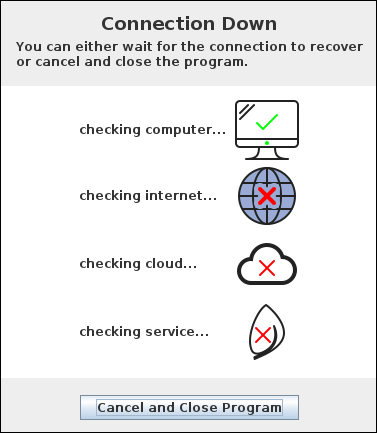
While the connection message displays, PlantX runs some simple diagnostics to help give you (and us) clues to how your computer's connection is performing. It tests the local computer and then well known sites on the Internet, then our network, and finally the PlantX service. If any tests return with a red X, it can reveal why the connection is down.
Give it a try! If you dare...
If you want to see this new feature in action, start PlantX and then unplug your computer from the Internet! I don't really recommend that you do it, but it does work. This is exactly how we test this feature! Just remember to plug back in before two minutes.
A note for those that use Broker Servers.
If your office has a Broker Server installed, and the Broker's Internet connection is interrupted, you will get a similar window showing the broker is disconnected. It doesn't show detailed diagnostics, but it does let you know that service to the Broker is interrupted. You may want to check your Internet connection, and if you see these often, let us know.